AI documentation for chiropractors

Your visit, captured. Your SOAP draft, ready for review.

Record the visit and turn it into a structured SOAP draft. Check the details, make your edits, and review the note before finalizing.

Start Free Trial

21 days · No credit card required

You review every line. The draft stays yours to check and edit before marking it reviewed.

See how recording and review work
Illustrative demo

One visit. A clearer note.

Ready for your review
  1. 1Record
  2. 2Draft
  3. 3Review
  4. 4Ready

Visit recording

DR: How's the low back since last visit?

PT: Better. Pain's down to about a four — it was a seven.

PT: Still doing the home exercises most days.

DR: L4–L5 and the right SI are still restricted. Treatment tolerated well.

DR: Let's keep twice weekly for two weeks and recheck in a week.

Synthetic patient example

SOAP draft Follow-up

S

Low back pain improved from 7/10 to 4/10. Compliant with HEP.

O

Restriction at L4–L5 and right SI. Treatment tolerated well.

A

Low back pain and lumbar segmental dysfunction, improving; L4–L5 restriction persists.

Example edit
P

Continue care twice weekly for two weeks. Recheck in one week.

Style suggestion

Write out “home exercise program” on first mention.

Illustrative sequence · You review every line.

Made for the way you care

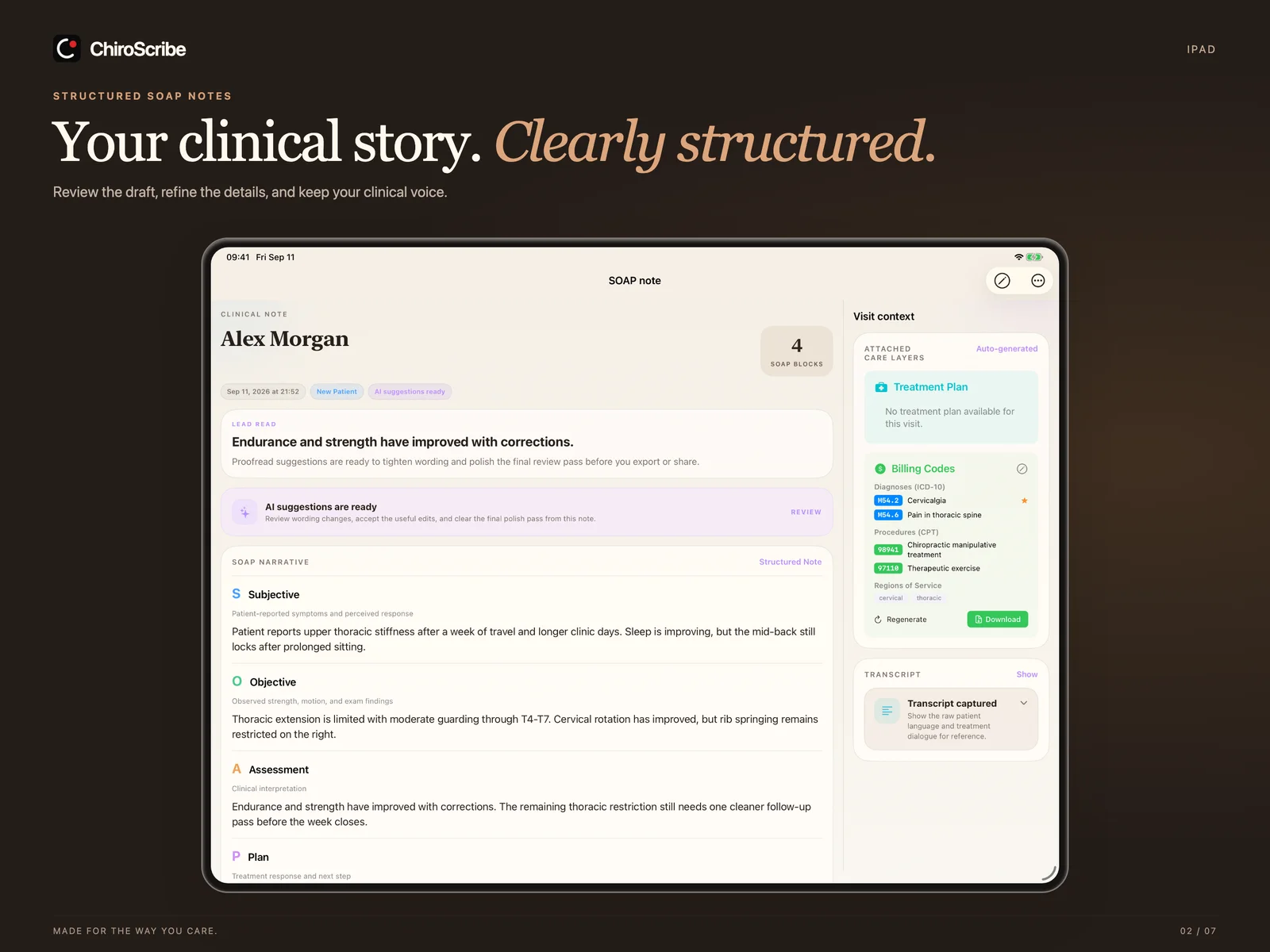
Room to see the whole note.

A larger workspace for the SOAP draft and its visit context.

Choose a device preview
ChiroScribe iPad preview showing a structured SOAP note beside visit context, billing support, and transcript controls.

Latest native interface preview · Synthetic patient examples · App Store availability may differ by version.

One patient story

From the table to the finished note.

Watch the product overview ↗
  1. 01 / 04

    Record on iPhone, iPad, Apple Watch, or the web — or import audio you already have.

    SC. 01 / 04 — CAPTURESynthetic data
    06:55
    Apple WatchiPhoneiPadWeb

    Start recording from whatever is closest. The recording becomes the source for the draft.

  2. 02 / 04

    Proofread suggestions wait beside the draft. Accept what fits; the rest stays yours.

    SC. 02 / 04 — REVIEWSynthetic data

    Alex Morgan · Follow-up

    Needs review
    SLow back pain improved to 4/10 (was 7/10). Stiffness with sit-to-stand.
    OL4–L5 restriction. Flexion improved. Straight leg raise negative bilaterally.
    ALumbar strain, improving; L4–L5 restriction persists.
    Proofread suggestionSpell out “SLR neg.” → “Straight leg raise negative bilaterally.”
    Accepted
    Proofread suggestionAdd the treated segment to the Plan.
    Accepted
  3. 03 / 04

    Progress, cadence, and imaging stay attached to the chart instead of your memory.

    SC. 03 / 04 — CONTEXTSynthetic data

    Alex Morgan

    6 visits · lumbar care plan

    Reported pain (0–10)
    Illustrative pain scores trending down over six visits.
    Follow-upDue this week
    ImagingLumbar lateral · findings reviewed
    Outcome measuresTracked across visits
  4. 04 / 04

    Patient summaries, PI narratives, and superbills — prepared from reviewed notes.

    SC. 04 / 04 — REPORTSSynthetic data
    Superbill

    CPT & ICD-10 codes

    PI case

    Narrative report

    Patient report

    Progress summary

The visit comes first.
Watch the product overview72 seconds
72 seconds · Sound-free, with on-screen explanation · Captured interface previewsRead the transcript ↗
Review

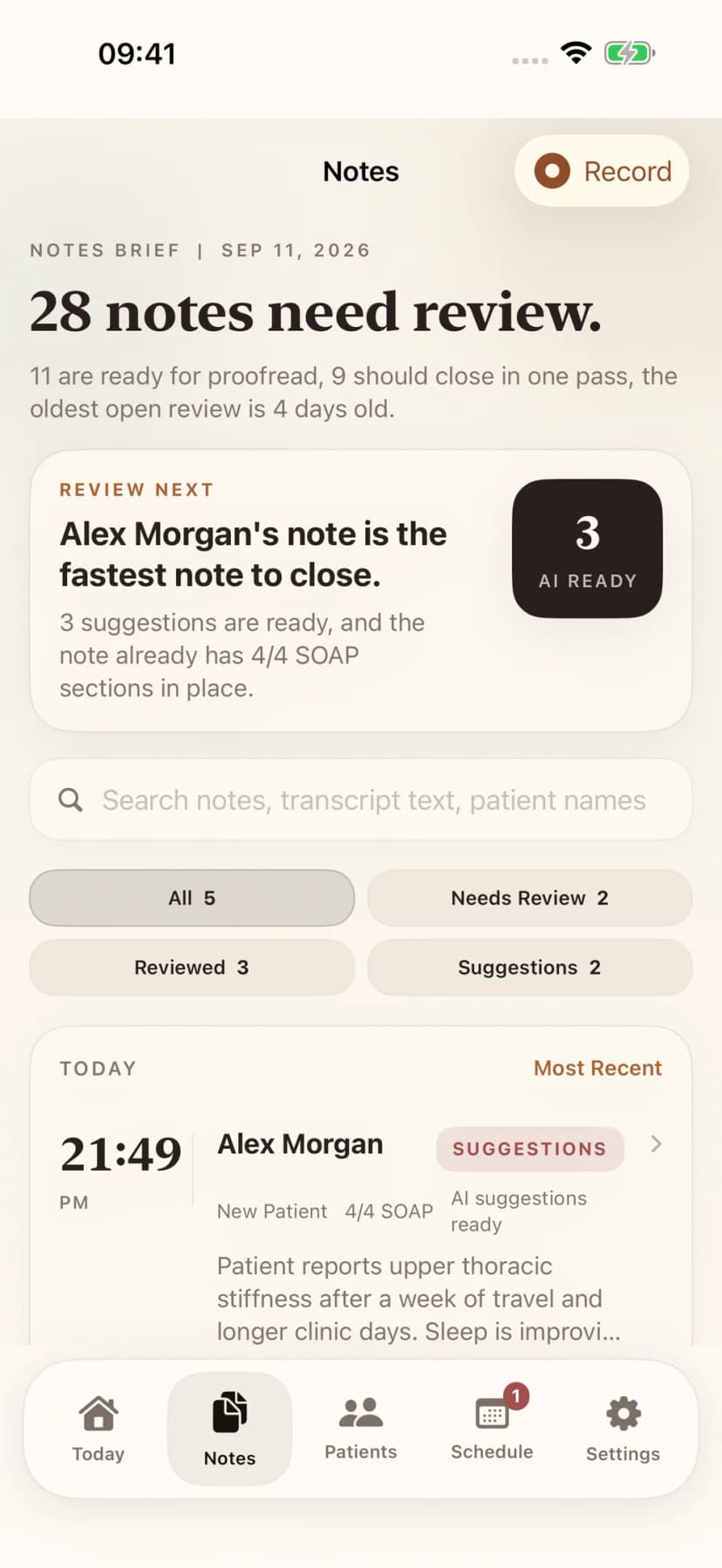
See which notes need review first.

Work the queue by urgency, suggestion readiness, and fastest-to-close opportunities. Move from captured visit to finished documentation with less admin drag.

  • Prioritize by review status, AI suggestions, and note readiness
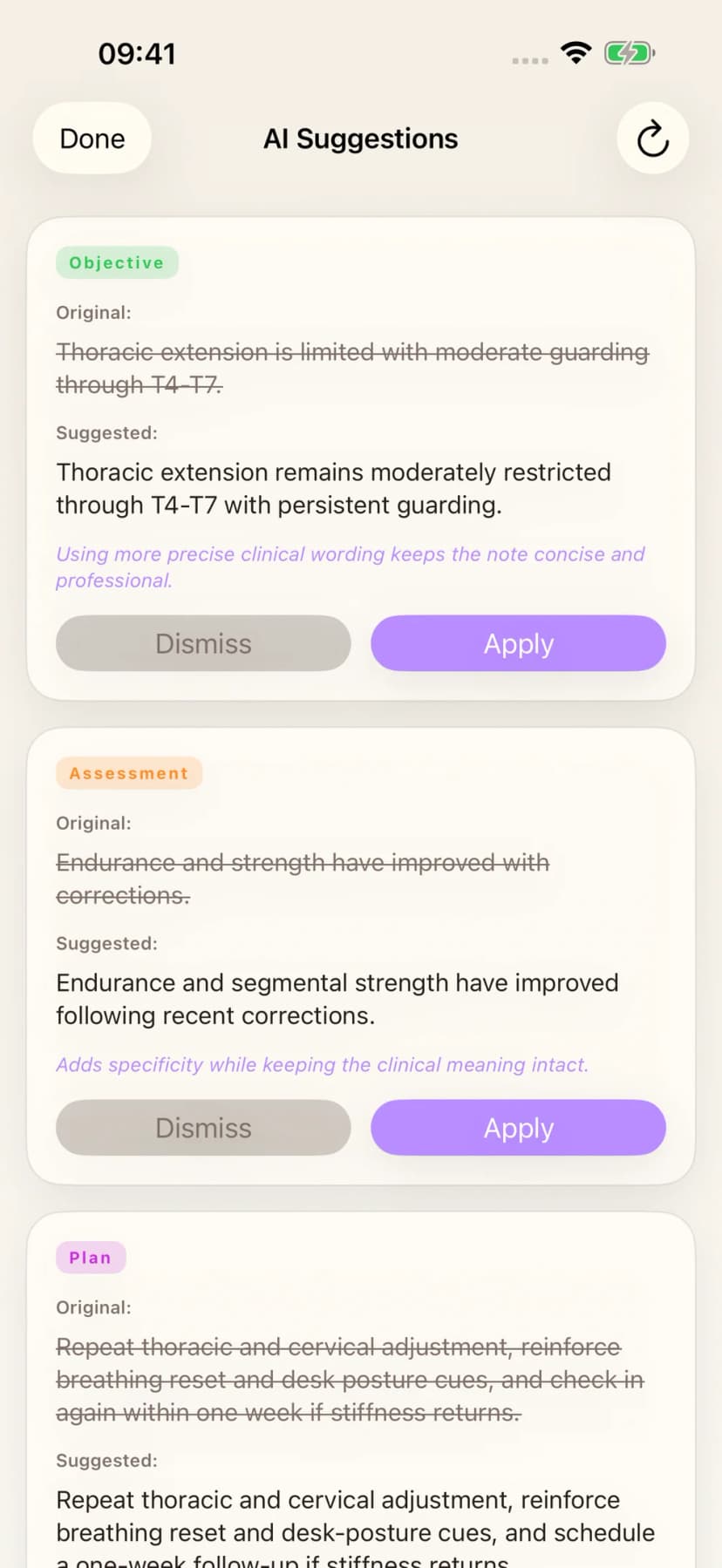
  • Apply proofread suggestions without rewriting by hand
  • Close the loop faster on notes closest to complete
AI that learns your style

Set your writing preferences explicitly. Eligible edits can help ChiroScribe adapt supported note-generation workflows over time.

Templates set the structure. Writing preferences guide expression. The recorded visit remains the source for clinical content.

Notes queue with review status and priority
AI proofread suggestions on a SOAP note

Beyond the SOAP draft

More of the patient story.
Less hunting for the details.

Keep the source, the review, and the next document connected.

Imaging & clinical studies

Start with the images.
The visit can come later.

Upload X-rays, MRI images, or clinical studies without creating a SOAP note first. Choose an existing patient or create a chart during intake, then follow each upload’s progress.

  1. Organize the evidence.Keep imaging and reports with the patient, with exam, visit, or PI-case associations where supported.
  2. Review what matters.Confirm, amend, reject, or mark individual findings uncertain. Use Correct & Re-read when an analysis needs another look.
  3. Choose the destination.Preview confirmed or amended findings before adding them to the Objective section of a selected SOAP draft.
Explore imaging & studies ↗

A re-read decision and an addition to a SOAP draft are separate actions. Imaging assistance supports provider review and does not replace a radiology interpretation.

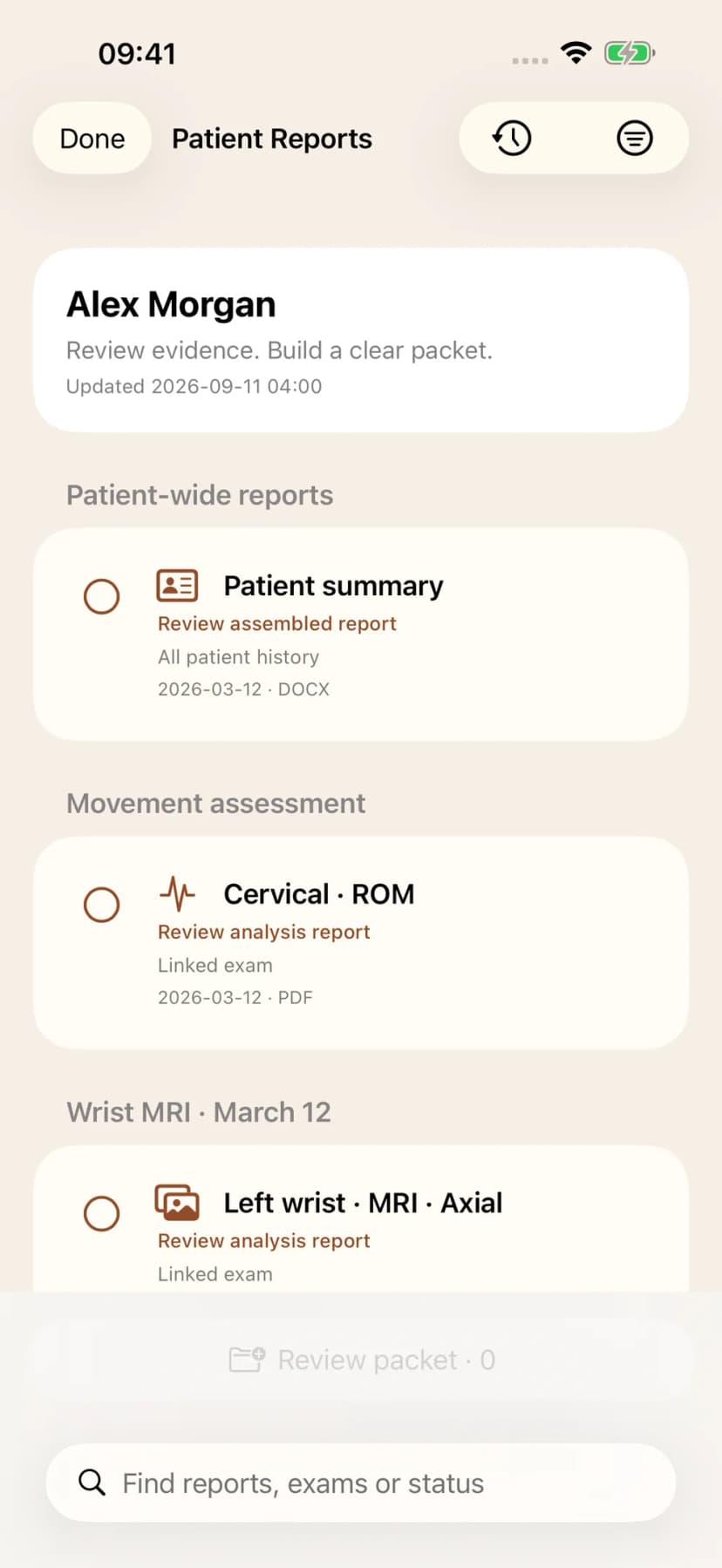
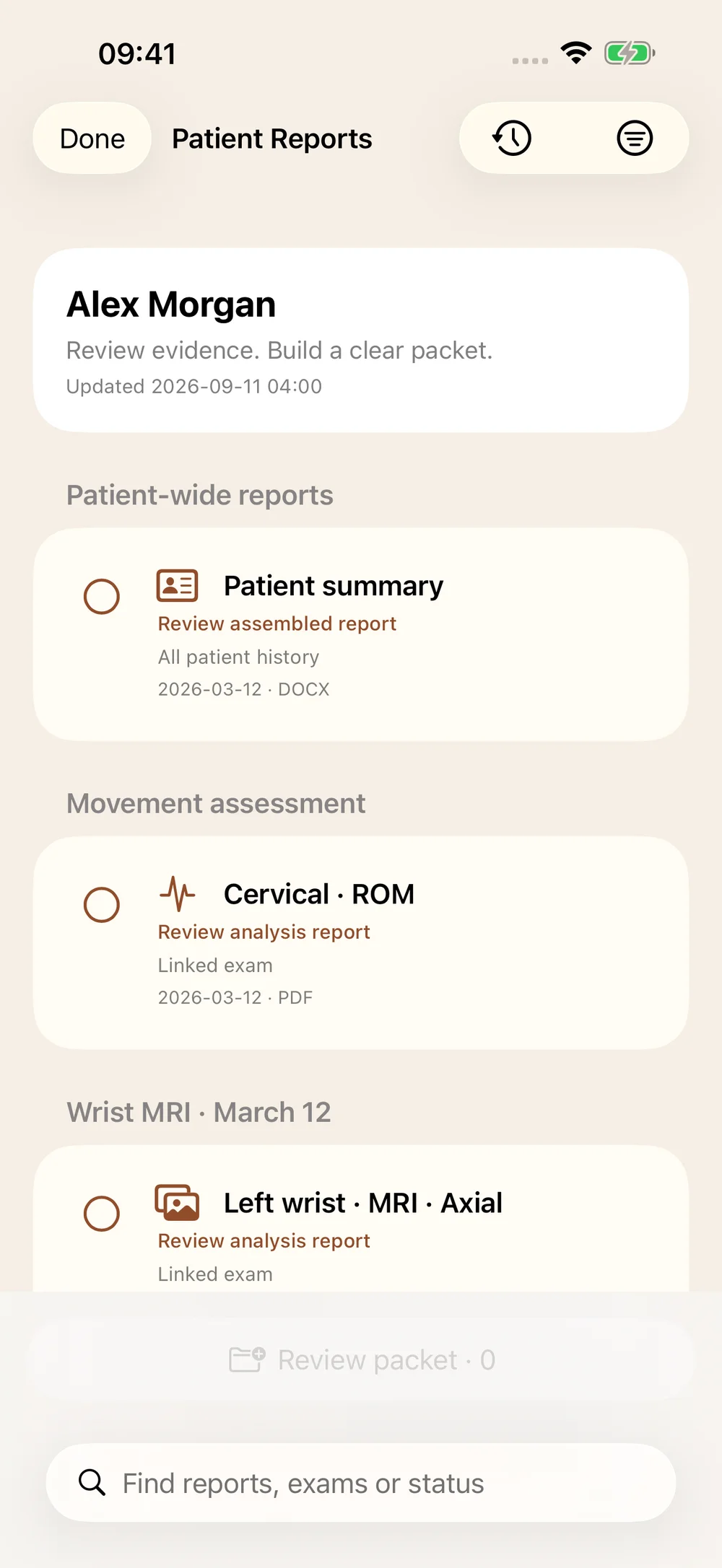
Native patient reports preview with a patient summary, movement assessment, and wrist MRI grouped by exam.
Patient reports · Native interface preview
01 / Your documentation voice

Structure and style.
Each with its own controls.

Set Daily, New Patient, and Re-Exam templates. Choose terminology, length, and tone through Writing Style. Eligible edits and reviewed examples can inform supported learning workflows.

Style preferences guide expression; the visit evidence remains the source for clinical content.

Explore documentation features
02 / PI Agent & reports

Know what is missing.
Build a clearer case.

PI Agent checks surface missing case details, unexplained care gaps, and outcome-measure documentation. Review the source-linked evidence timeline, then prepare patient, imaging, and insurance reports with the case context close at hand.

Keep relevant source references and uncertainty in the reviewed document.

Explore PI documentation
Practice Configuration

Make the AI match how your clinic actually documents care.

Create your provider documentation profile once. ChiroScribe applies relevant preferences across SOAP notes, imaging, proofreading, treatment plans, and future-care narratives, while practice templates control visit structure.

  • Provider profiles control individual voice, terminology, emphasis, and formatting
  • Practice templates control the structure for Daily, New Patient, and Re-Exam visits
  • Choose which proofread suggestions appear automatically before review starts
  • See how accepted edits teach the AI to better match provider preferences
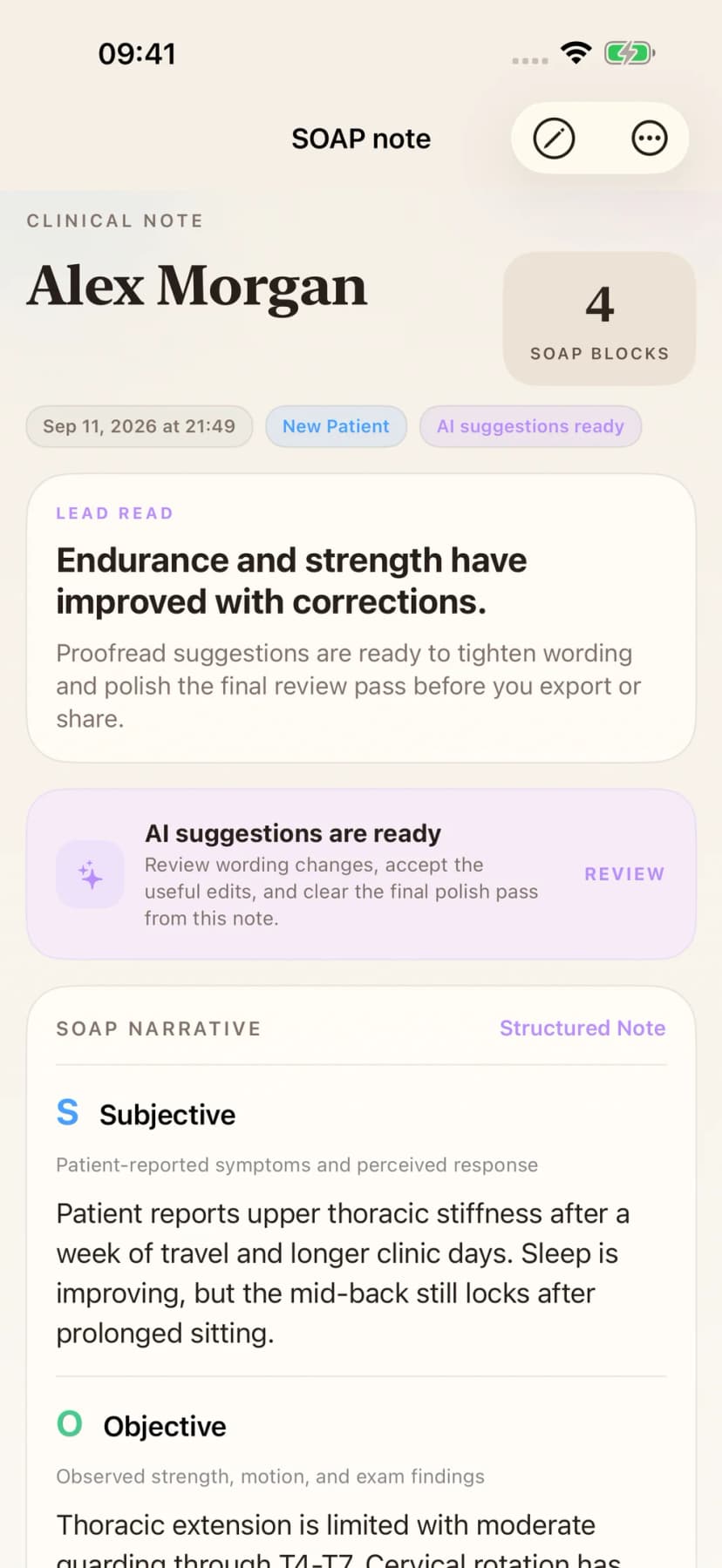
Native preview of a structured SOAP draft for provider review
Native preview of suggestions compared with original note wording
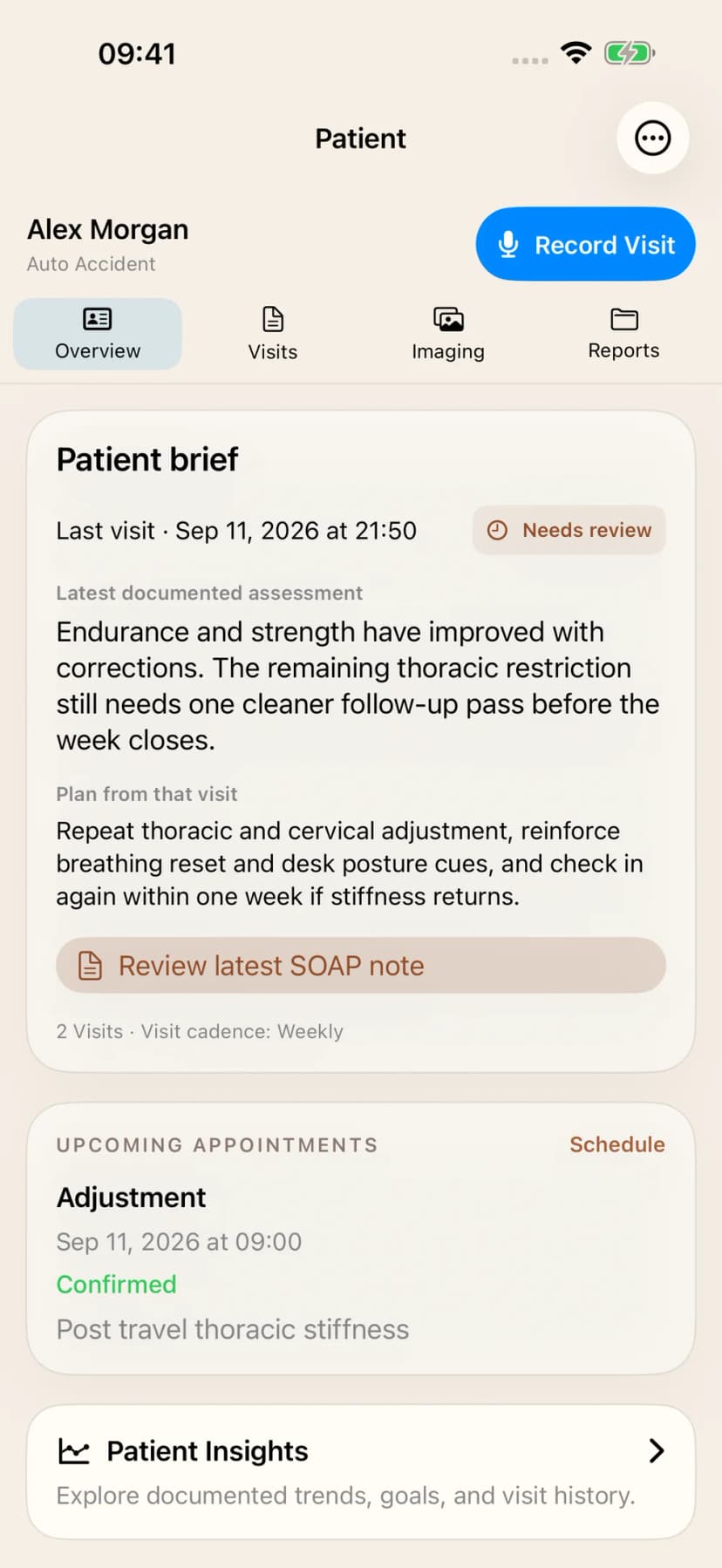
Patient Context

Keep the whole patient story in one place.

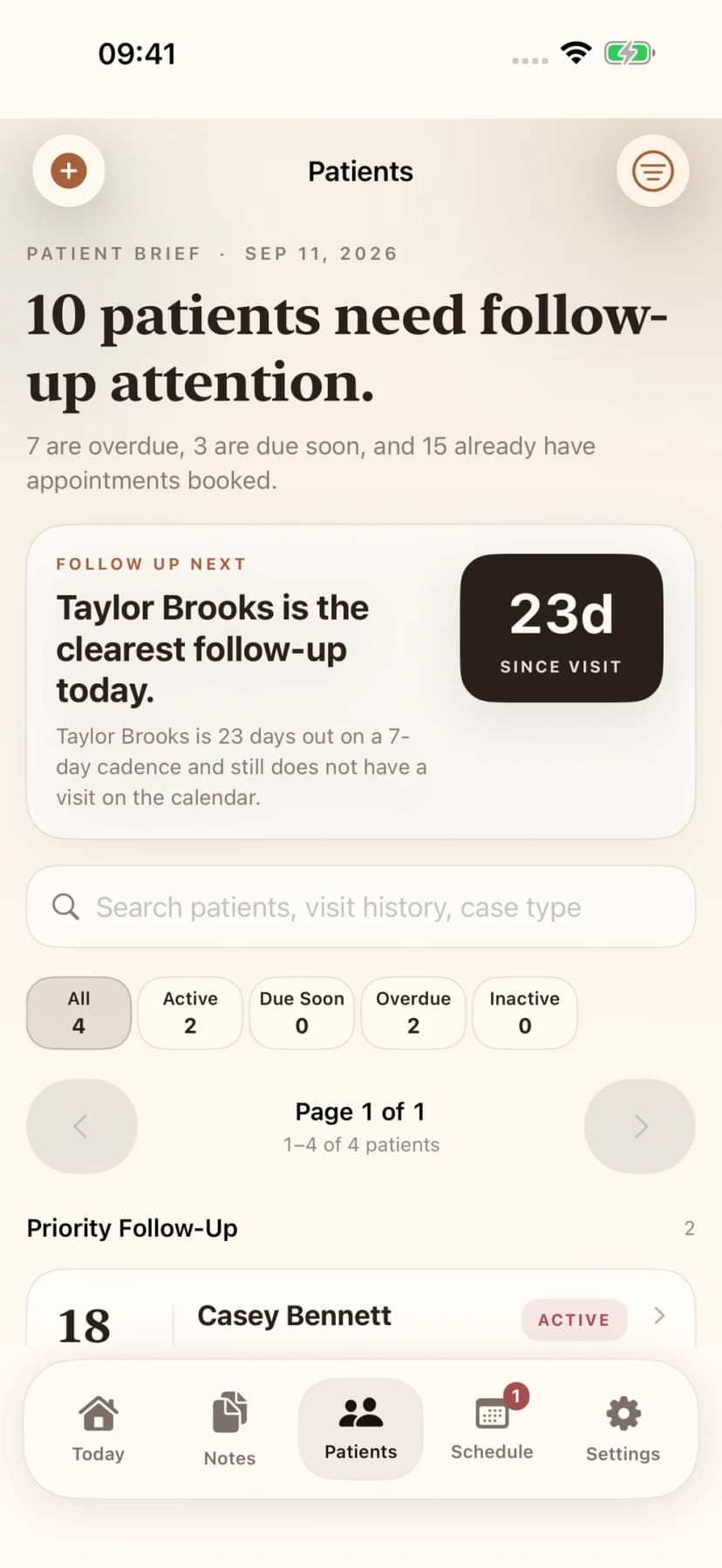
Recent notes, cadence, follow-up risk, future care, and reporting stay attached to the patient so the next action stays grounded in the chart instead of memory.

  • Know who is overdue, due soon, or already booked
  • Open a patient portfolio with notes, cadence, and next actions together
  • Turn recent chart history into usable patient-specific context
Patient list with follow-up status
Patient detail with visit history
The All-in-One Chiropractic Platform

Notes. Imaging. Treatment plans. Scheduling. Billing codes. One login.

Keep documentation, imaging review, scheduling, and billing support close together. Use ChiroScribe alongside your existing EHR where needed.

SOAP Notes
Drafts for review
X-ray Analysis
Provider-reviewed findings
MRI Analysis
Vision AI findings
Treatment Plans
Auto-generated
Scheduling
Online booking
AI SuperbillNEW
CPT & ICD-10 codes
iOS App
iPhone, iPad + Watch
Operations

Schedule and reports, same workflow.

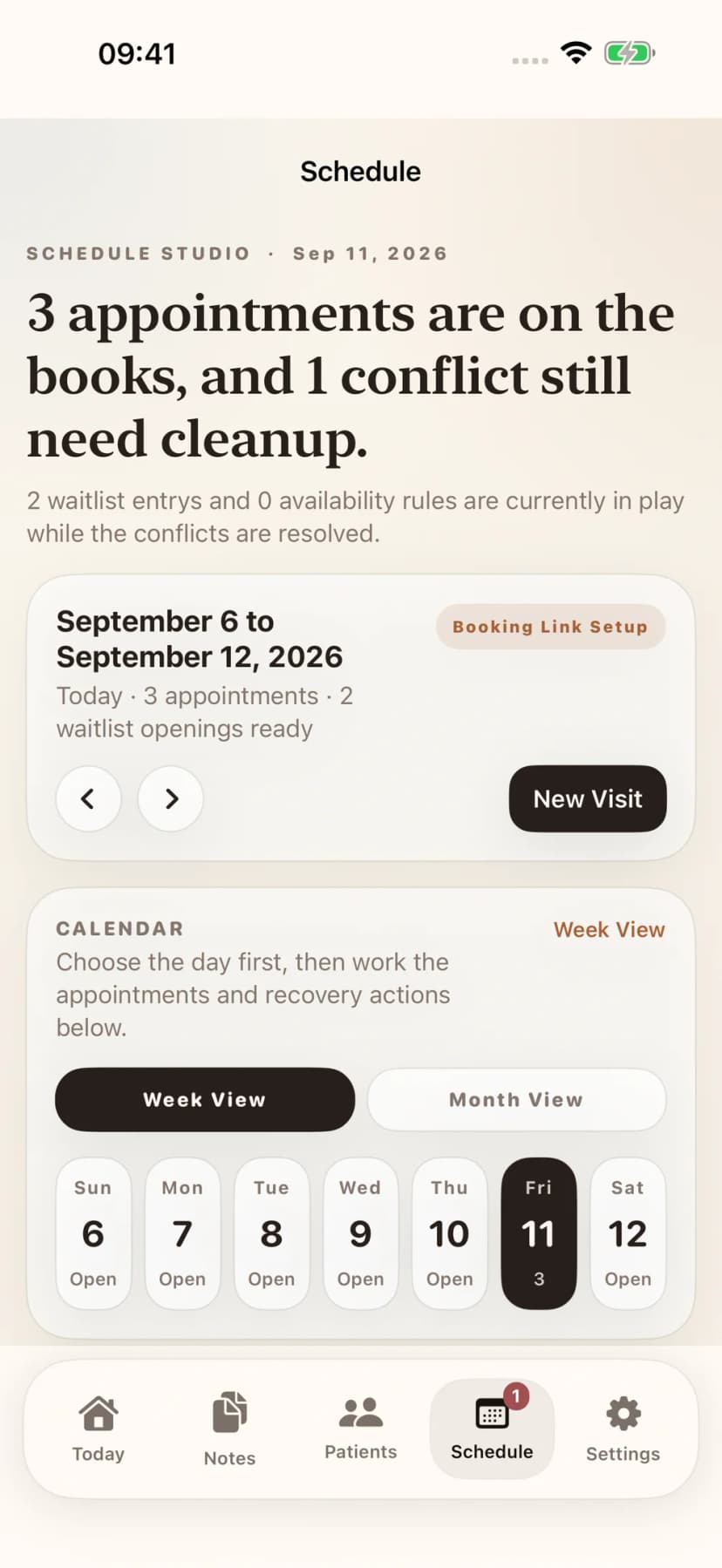
Schedule

Manage visits, waitlist, and booking without losing the thread of the day. Week view, month context, and booking controls together.

  • See the week and active agenda together
  • Handle waitlist and availability inline
  • Keep booking pressure visible early
Explore chiropractic scheduling software
Schedule view with weekly calendar

Reports

Patient summaries, imaging reports, and billing paperwork — ready from the same workflow.

  • Patient, imaging, and billing documents in one hub
  • Clinical, attorney, and insurance report variants
  • Less handoff friction when records leave the practice
Reports hub with patient summaries
Security & Compliance

Your patient data, locked down.

HIPAA Compliant

Learn more →

AES-256 Encrypted

Field-level encryption

Audit Logging

PHI access events

BAA Available

Enterprise ready

Built for real chiropractic workflow

Done Before You Leave

Record between patients, not after hours. Keep the review queue close so notes are easier to finish during the day.

Speaks Your Language

T4-5 adjustments, subluxation complexes, and technique-specific terminology are understood automatically.

Record Anywhere

Apple Watch walking to the next room, iPhone in the hallway, or your computer at your desk. Notes sync automatically.

Pricing

Simple, transparent pricing

Start free, upgrade when you're ready.

Solo

$179/mo

Perfect for individual practitioners

What's included
  • Unlimited SOAP notes
  • Voice recording & file upload
  • Patient management
  • Online scheduling & booking
  • AI superbill generation
  • Provider writing profile + AI style learning
  • AI treatment plans
  • Google Drive sync
  • iPhone, iPad & Apple Watch app
  • Email support
Start Free Trial

No credit card required

Most Popular

Practice

$299/mo

For growing practices with multiple providers

= $60/provider/mo for 5 providers

Everything in Solo, plus
  • Up to 5 providers
  • Team dashboard & analytics
  • Case-type documentation
  • Insurance-aware note rules
  • Custom SOAP templates
  • AI X-ray & MRI analysis (DICOM supported)
  • Provider-guided imaging re-reads
  • Priority support
Start Free Trial

No credit card required

Enterprise

Custom

For large practices and clinic groups

Everything in Practice, plus
  • Unlimited providers
  • HIPAA BAA included
  • Multi-location management
  • SSO / SAML authentication
  • PHI audit logs & compliance reports
  • Custom EHR integrations
  • Dedicated account manager
Contact Sales
FAQ

Common questions

What does ChiroScribe help a chiropractor do?
ChiroScribe turns visit recordings into SOAP drafts and brings note review, patient context, imaging, reports, scheduling, and billing support into a connected workflow. Providers review clinical content before finalizing it.
Can I upload imaging before creating a SOAP note?
Yes. Start with X-rays, MRI images, or a clinical study. Select an existing patient or create a chart during intake. A SOAP note is not required to upload imaging.
How do reviewed findings get into a SOAP draft?
Review individual findings, save confirmed or amended decisions, and select a destination draft. Preview the exact addition before applying it to Objective. Selecting a visit or accepting a re-read alone does not add findings to the note.
How does ChiroScribe support PI documentation?
Case-type-aware notes, case evidence with source references, reviewed imaging, and report workflows help providers prepare personal injury documentation. Providers determine clinical interpretation and causation from the available evidence.
Does the AI learn my writing style?
Writing Style controls terminology, detail, and tone. Templates control visit structure. Eligible edits and reviewed examples can inform supported learning workflows; clinical content must remain grounded in the visit.
Can I use my computer, iPhone, iPad, or Apple Watch?
Use the web workspace from your browser and the native app on iPhone or iPad. Apple Watch supports recording. Interface previews on this page show the latest native build; App Store availability may differ by version.
Where can I review security and plan details?
The Security and HIPAA page explains patient-data safeguards and the BAA process. The Pricing page lists current plans and inclusions. You can start a 21-day trial without a credit card.

Make room for the work you came to do.

Stop spending evenings on documentation. Start your free trial today — no credit card required.