How to Correct and Re-read an X-ray or MRI Analysis
Correct & Re-read lets a provider flag anything that looks off in an AI imaging analysis, get an independent second read of the entire image, and compare the current and proposed analyses side by side. Nothing changes until the provider accepts the revision.
How this works in ChiroScribe
Open the imaging gallery
Open the patient's chart and go to the imaging gallery.
Select the study
Select the X-ray or MRI whose analysis deserves another look.
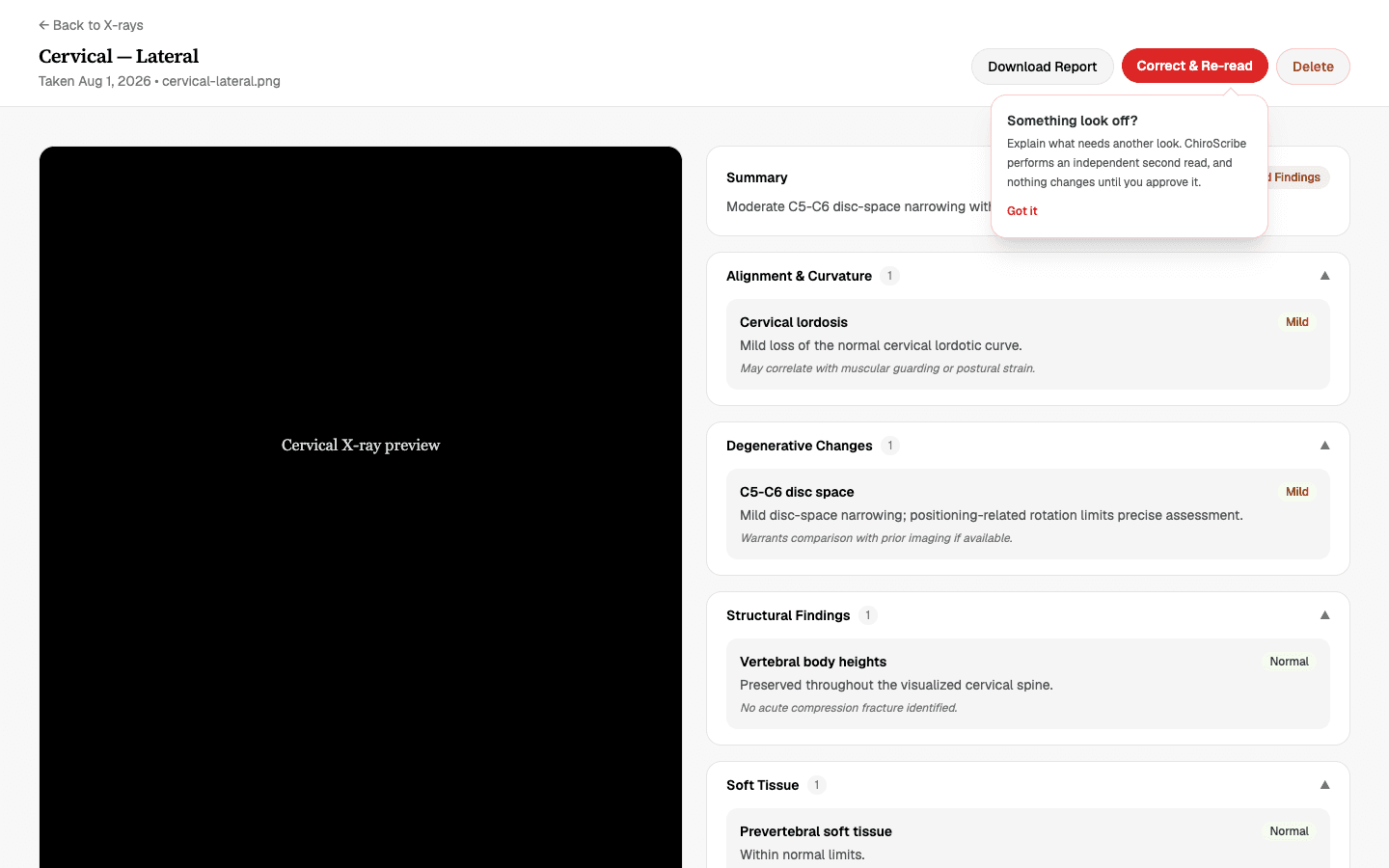
Choose Correct & Re-read
Choose Correct & Re-read on the analysis view.
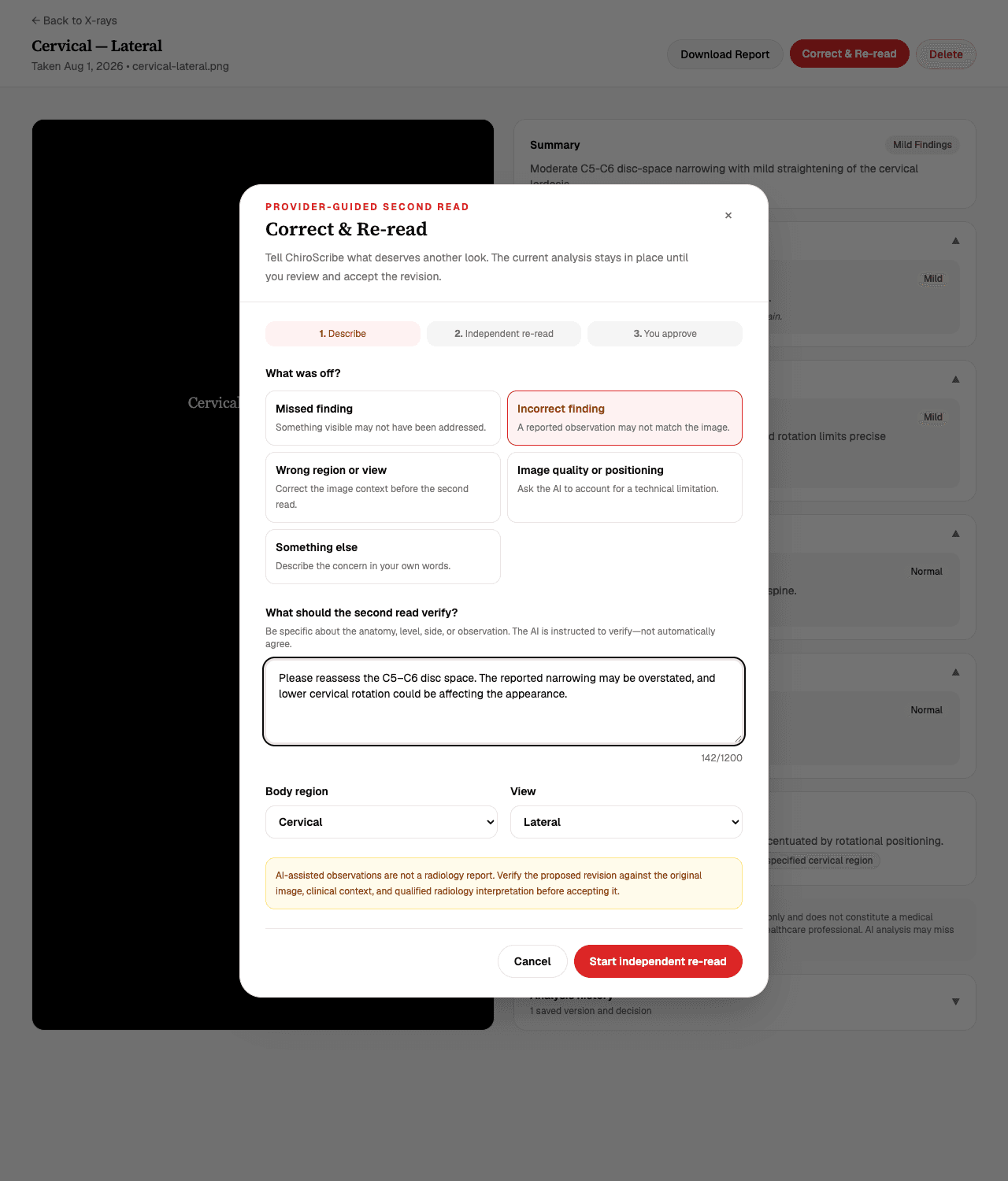
Pick a reason
Select the reason something looks off — for example, a finding may have been missed, a finding may be incorrect, or image quality affected the read.
Describe your concern
Describe the anatomy, spinal level, side, view, positioning issue, or finding that needs review.
Confirm region and view
Confirm or correct the body region and view so the second read starts from accurate context.
Start the second read
Start the independent second read. Your current accepted analysis remains unchanged while it runs.
Review the comparison
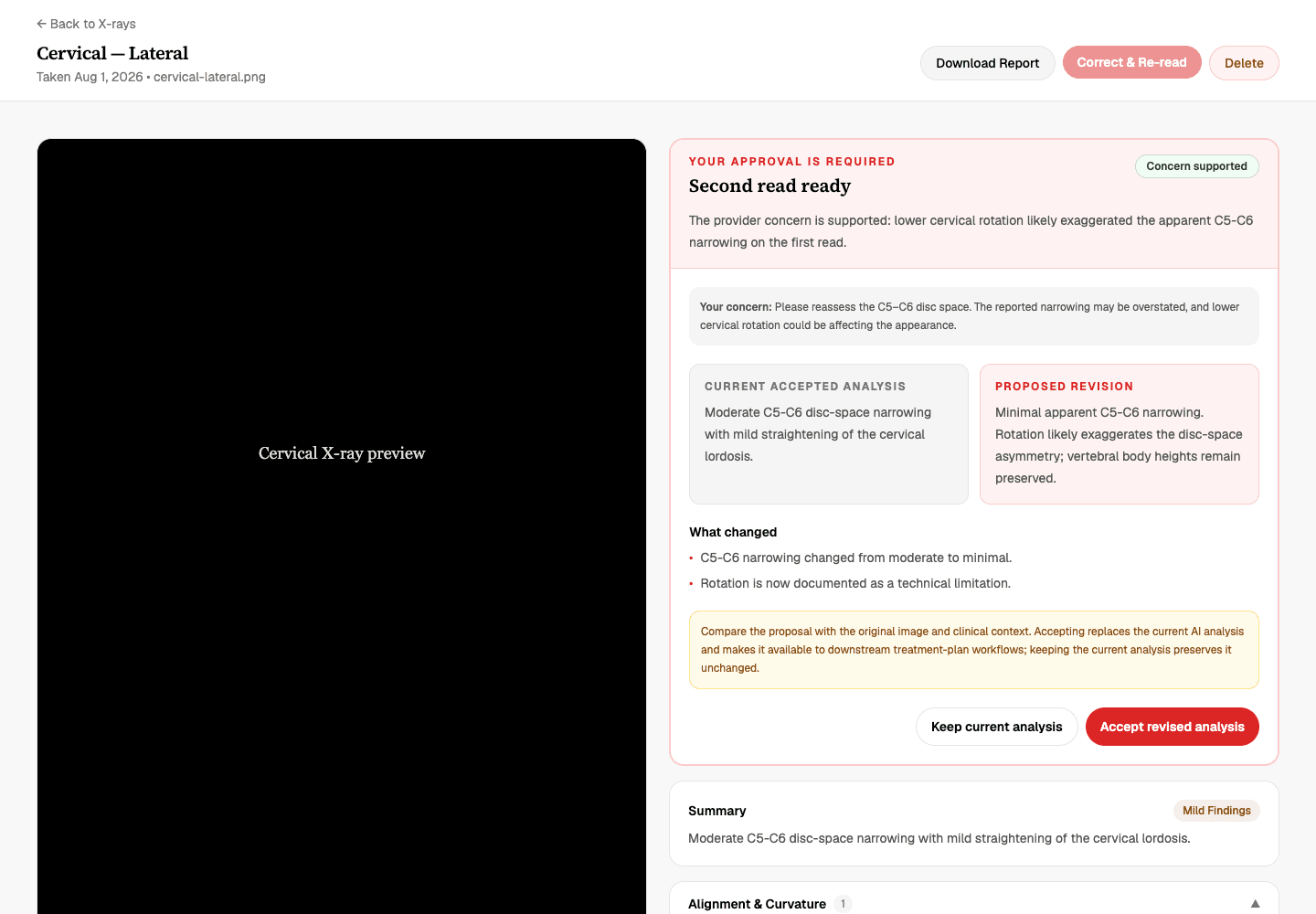
Review the concern assessment and the side-by-side view of the current and proposed analyses.
Accept or keep
Accept the revised analysis, or keep the current analysis. Nothing changes until you decide.
What Correct & Re-read does
Correct & Re-read is a provider-guided second read. You explain what appears incorrect or missing, and ChiroScribe independently reassesses the entire image — not just the flagged area — before returning a proposed analysis.
Alongside the proposed analysis, ChiroScribe reports whether your specific concern is supported, not supported, or indeterminate. The AI is instructed to evaluate the evidence, not to agree with your feedback.
When to use it
Use Correct & Re-read when a finding seems overstated or missed, the reported level or side looks wrong, the body region or view label is incorrect, or image quality or positioning may have skewed the read.
It also works for any other section of the analysis that needs a second look. For SOAP notes, edit the text directly instead — Correct & Re-read is specific to imaging analysis.
Writing a useful concern
Be specific about the anatomy, spinal level, side, and view involved, and mention any positioning issue you noticed. Concerns must be between 10 and 1,200 characters.
Please reassess the C5–C6 disc space. The reported narrowing may be overstated, and lower cervical rotation could be affecting the appearance.
Never put patient-specific PHI in your provider writing-style settings or reusable templates — the re-read concern belongs with the specific study, not in your profile.
Supported, not supported, or indeterminate
Every second read returns one of three assessments of your concern. Supported means the second read found evidence consistent with your concern. Not supported means the second read did not find evidence for it and explains why.
Indeterminate means the image does not allow a confident call either way — usually because of image quality, positioning, or the limits of the view. A "not supported" result is a feature, not a failure: it protects the record from unsupported changes.
Comparing the current and proposed analyses
Once the second read finishes, ChiroScribe shows the current accepted analysis and the proposed revision side by side, along with a summary of what changed between them.
The current analysis remains the analysis of record for as long as the comparison is under review — nothing is overwritten while you decide.
Accepting a revision or keeping the current analysis
If you accept, the proposed analysis becomes the accepted analysis and the prior version is kept in revision history, encrypted like other clinical content.
If you keep the current analysis, nothing changes — the proposed revision is retained in history but has no effect on the record. Either way, the decision is yours, and it can only be revisited by running another re-read.
What flows into downstream documents
Only accepted findings become available to SOAP-note generation, treatment plans, and patient reports. A proposed revision never reaches those downstream documents while it is still under review.
Safety and clinical review
AI output is a set of AI-generated observations meant to support, not replace, your own professional review of the image. You remain responsible for clinical interpretation and documentation.
Provider feedback, proposed findings, and revision history are all encrypted, consistent with how ChiroScribe protects other clinical content.
Troubleshooting
If you can't see the Correct & Re-read button, imaging is a Practice-plan feature, and only owner and provider roles can request re-reads.
If your concern won't submit, check the length — it needs at least 10 characters. The second read itself runs in the background and the page updates automatically when it is ready, so it can take a moment to appear.
If a result comes back indeterminate, consider whether image quality or positioning limited the read, and re-shoot or use a different view where clinically appropriate. Contact support@chiroscribe.io if something looks stuck.
Common questions
Does explaining my concern force the AI to agree with me?
No. The second read is independent — ChiroScribe reassesses the entire image and reports whether your concern is supported, not supported, or indeterminate based on what the image shows.
Will a proposed revision change my SOAP notes or reports automatically?
No. Only findings you explicitly accept become available to SOAP notes, treatment plans, and patient reports. Proposed revisions have no downstream effect while under review.
What happens to the current analysis during a re-read?
It remains the accepted analysis of record and is not modified. You compare it against the proposed revision and decide.
Is the revision history stored securely?
Yes. Provider feedback, proposed findings, and revision history are encrypted, consistent with how ChiroScribe protects other clinical content.
Who can request a re-read?
Practice owners and providers on plans that include AI X-ray & MRI analysis (Practice and up).